Core Features
Tool Execution
Arif AI can execute over 50 integrated tools to perform actions on your Mjara ERP system. When you ask the AI to do something that requires system interaction, it automatically selects and invokes the appropriate tool.
How Tool Execution Works
- The AI determines which tool is needed based on your request
- The Tool Manager validates parameters against the tool's schema
- User permissions are checked at the DocType level
- Risk level is assessed to determine if confirmation is needed
- The tool executes, and results are returned to the conversation
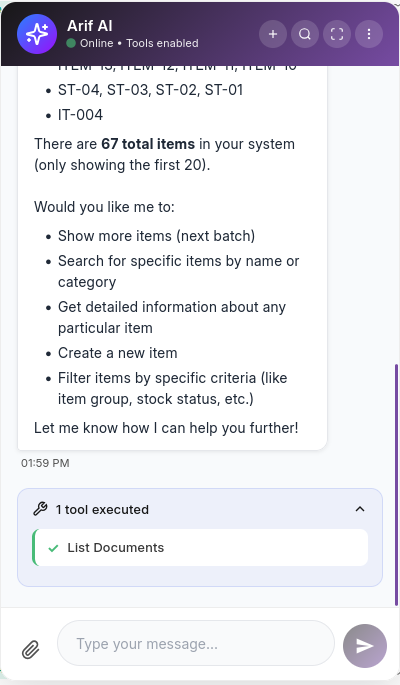
Tool Execution in the Chat
When a tool executes, you'll see a status indicator in the chat showing:
- Which tool was called
- Whether it succeeded or failed
- The results of the execution
Permission Model
All tool executions respect Mjara's role-based access control. A user can only perform operations they have permission for. If a user lacks permission to create a Sales Invoice, the tool will fail with a permission error rather than bypassing security.
Execution Logging
Every tool execution is recorded in the Arif Tool Log DocType with:
- Tool name and parameters
- Execution result (success/failure)
- Execution time in milliseconds
- User who initiated the request
- Timestamp