Bulk Rename
Using the Bulk Rename tool, you can choose to rectify/change multiple document IDs at once. This tool is only accessible to the User who has the System Manager role assigned.
Rename Tool
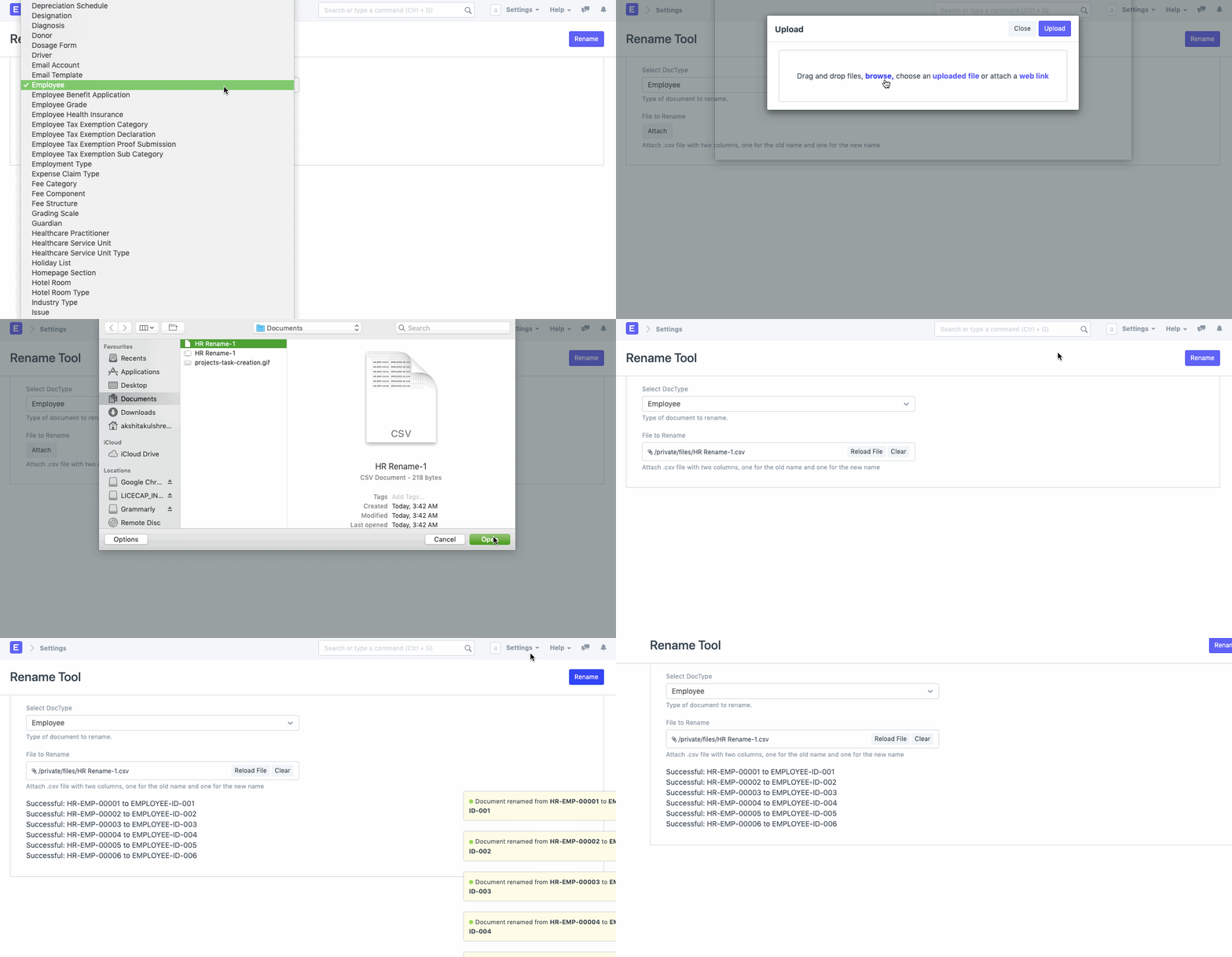
You can rename IDs of up to 500 records at a time. The following are steps to bulk rename bulk records. Let's assume we are renaming Employee IDs for the existing employees.
Step 1: Open Excel File
In a spreadsheet file, enter old Employee IDs in the first column, new Employee Ids in the second column, and whether this record should be merged with an existing (false by default). Save spreadsheet file in a CSV format without the header.
| Old Name | New Name | Merge |
|---|---|---|
| HR-EMP-00001 | EMP0001 | FALSE |
| HR-EMP-00002 | EMP0002 | FALSE |
| HR-EMP-00003 | EMP0003 | FALSE |
| HR-EMP-00004 | EMP0004 | FALSE |
| HR-EMP-00005 | EMP0005 | FALSE |
| HR-EMP-00006 | EMP0006 | FALSE |
Step 2: Upload Data File
To upload data file go to,
Settings > Data > Bulk Rename
Select DocType which you want to rename. Here, DocType will be Item. Then Browse and Upload data file.
Last updated 3 weeks agoWas this helpful?
Submit
Thanks!